Here is the solution for those who like to create pdf file without spending a lot of money. All you have to do is install the software. From my own experience, the control panel is straight forward and it will not take to much time for you to familiarize. Combine this Foxit PDF Editor (for your information Foxit PDF Editor is not free), you will see the difference.
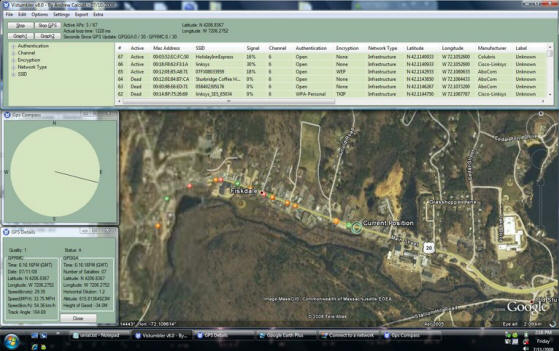
Vistumbler is a software that scan for wireless network nearby. Combined with GPS tracking device, this software can pinpoint the access point exact location. If you're looking for wifi scanner for Windows Vista, this is the software.
Supported Operating System : Windows Vista
Features :
Integrated with Google Earth for easy tracking
Can import/export files from Vistumbler TXT/VS1/VSZ or Netstumbler TXT/Text NS1
Do you know that you can run antivirus without having to install it? With Clamwin Portable, you can. On system with lower RAM (256 MB and below), this is the best choice because you get protection and at the same time, does'nt make your system slow. If you're always transfer files from flash drive or otherwise, you can also make use of it. You can download this antivirus HERE
Step by step on How To Install ClamWin Portable
1. Run the installer
2. Click Next
3. Select desired directory for installation. If you want to install on your computer, go to C:\Program Files\ClamWin Portable. If the directory is not there, create a new folder and rename it as Clamwin Portable. If you would like to install on flash drive, select your flash drive and make new folder and rename it as Clamwin Portable. Click Install to continue.
4. ClickFinish the end the installation. Now you can run ClamWin Portable
Steps Required Before You Can Use ClamWin Portable
In order for you to use ClamWin Portable, you have to download virus definition files.First, run ClamWin Portable.
Dialog box as below will appear.
Click Yes. After ClamWin Portable finished download the required files, you can use the ClamWin Portable as normal.
Tired with advertisements in Yahoo Messenger? Download YM Patch and remove unwanted advertisements. For your information, this patch only works with Yahoo Messenger versions 9.0.0.2018 and 9.0.0.2034. The only disadvantage with this patch is it does not remove ads in chat rooms and webcam. Maybe the author will look into it in the upcoming release.
Do you exactly the device inside your computer? The CPU used or maybe chipset used on your motherboard? Using CPU-Z, you can get this information without having to open the entire casing.
Mainly, CPU-Z can give you information about your current CPU, mainboard, types of RAM that are currently installed, windows version and, DirectX version. CPU-Z is also been used by overclockers to fine tune their box.
To run this program, just extract it to desired folder and run the executable. You don't have to install this software. This file is in ZIP format.
You can click the link below to download the latest version (CPU-Z v1.49)
This tutorial only applies to system running Win98,Win2k & Winxp
1. First, you have to download winamp, click HERE to download Winamp 2. After that, download SHOUTcast Radio DSP plug-in. The plug-in is available HERE
SHOUTcast Radio DSP plug-in REQUIREMENTS: * A reasonably fast (300Mhz or faster) PC running Windows 95, 98, NT, 2000, or ME. Windows 3.x is not supported. * Winamp 2.65 or greater (this plugin does not work with winamp 3.x) -- If you plan on broadcasting using enc_aacplus, your clients must have Winamp 5.04 or greater * A big pile of tracks(No DRM Tracks though), or a soundcard input for live streaming. * A good, reliable internet connection between you and the DNAS (SHOUTcast Server)
3. Download SHOUTcast WIN32 Console/GUI server v1.9.8. You can download the file HERE 4. Install Winamp ,SHOUTcast Radio DSP plug-in and SHOUTcast WIN32 Console/GUI server v1.9.8 5. Execute Winamp and go to preferences (right click in Winamp). Click Plug-ins > DSP Effect > Nullsoft SHOUTcast Source DSP v1.9.0. See below for example:
6. Click on 'Encoder' tab. Go to Encoder settings. Select '56kbps, 22,050kHz, Stereo'. P/S : For this example I will be using 56kbps, 22,050kHz, Stereo
7. Click on 'Output' tab. Go to 'Output Configuration'. Enter your IP Address in the 'Address' text box. Again for this example I will be using 192.168.1.1 as IP Address.
8. Click Start > All Programs > SHOUTcast DNAS > Edit SHOUTcast DNAS configuration. Go to 'AdminPassword' section. Change the default password.
; AdminPassword. This password (if specified) changes the ; behavior of Password to be a broadcast-only password, and ; limits HTTP administration tasks to the password specified ; here. The broadcaster, with the password above, can still ; log in and view connected users, but only the AdminPassword ; will grant the right to kick, ban, and specify reserve hosts. ; The default is undefined (Password allows control for both ; source and admin) ; AdminPassword=adminpass --> change "adminpass" to another, for security reason...
9. Save the configuration file and click Start > All Programs > SHOUTcast DNAS > SHOUTcast DNAS (GUI)or Start > All Programs > SHOUTcast DNAS > SHOUTcast DNAS (Console).
10. Finally, go to Winamp. Open Winamp Preferences, go to Plug-ins > DSP Effect > Nullsoft SHOUTcast Source DSP v1.9.0.Click on 'Output' tab and click'Connect'. Usually the plug-in will work without problem UNLESS YOUR ROUTER/FIREWALL PROHIBIT YOUR CONNECTION. IF YOU'RE HAVING PROBLEM, CONSULT YOUR ROUTER MANUAL/FIREWALL DOCUMENTATION FOR MORE INFO. IF YOU WANT ME TO GUIDE YOU, PLEASE DON'T HESITATE TO ASK. I WILL TRY MY BEST TO HELP YOU BUT PLEASE BE SPECIFIC. INDICATE YOUR ROUTER MAKE & MODEL AND, TYPES OF FIREWALL THAT YOU ARE CURRENTLY USING.
How To Play Streaming Audio On Client PC? 1. Open your audio player. If you're using Windows Media Player, Click File > Open URL and then put 'http://192.168.1.1:8000' in the text box. Click OK.Finally, Enjoy your music....
Do you know that there is a free program that can clean windows temporary files, firefox, IE and Opera? ATF-Cleaner does the job flawlessly. There is no need to install the software. Just run the executable. The software can also be used on flash drive, maybe pair it with Opera Portable for added functionality....
This software has been given rating 4.71 of 5 from 283 votes (based from majorgeeks.com
For your information, this software run on windows XP and Windows 2k only.
Sometimes we may encounter situations where we cannot even think a single password. Don't worry, by using Random Password Generator, you can generate as many as you want and best of all it's FREE...
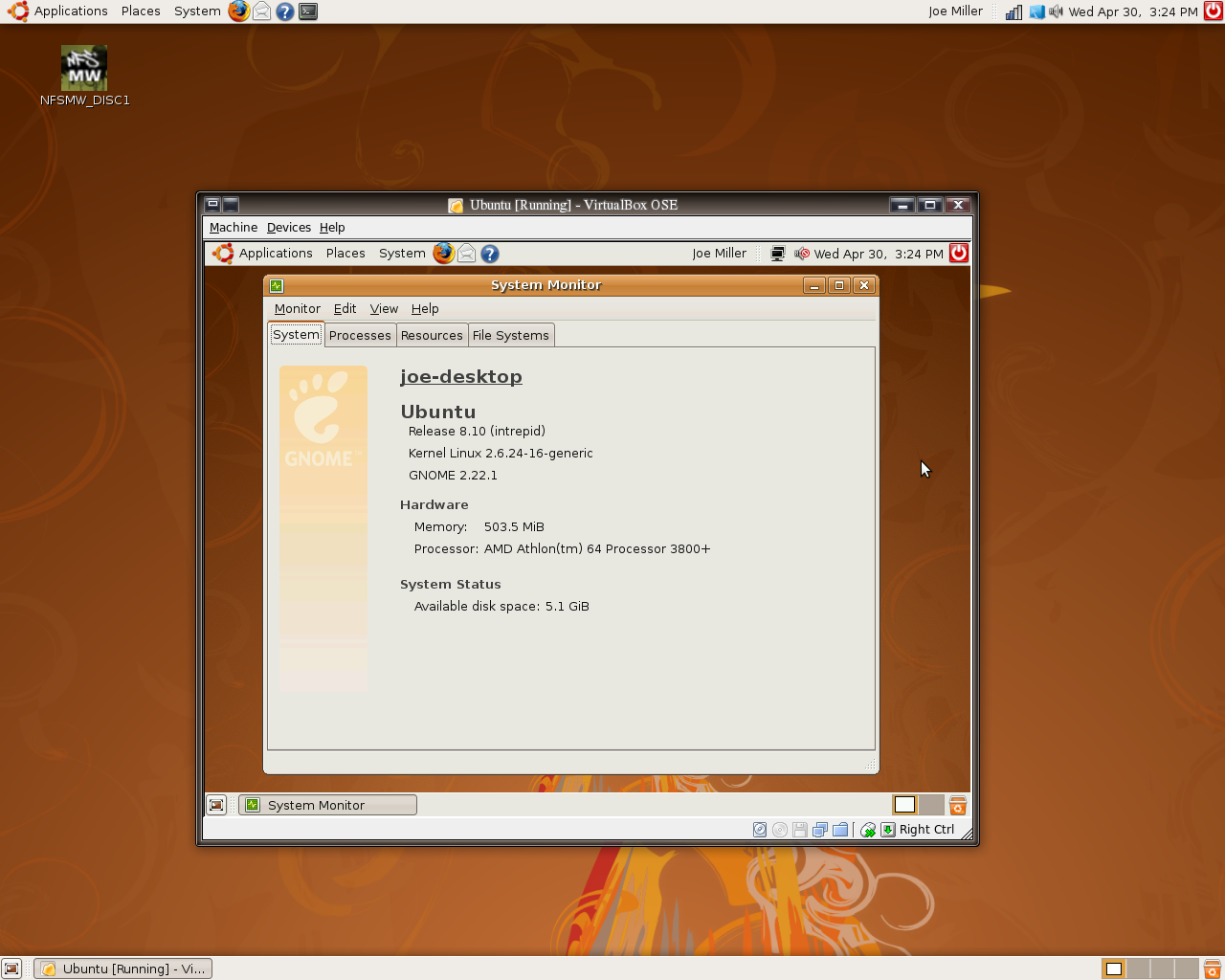
Finally, Canonical Ltd released Ubuntu 8.10 aka Intrepid Ibex today. Ubuntu 8.10 comes in two versions, Ubuntu 8.10 Desktop Edition and Ubuntu 8.10 Server Edition.
Here is the snapshot...Click To Enlarge...
To get Ubuntu 8.10 log on to this website and select your location
If you like to see a complete list of ubuntu mirrors, click here
I just came across this great software, Buddy Spy which can detect invisible users in Yahoo Messenger. Sometimes your friends trying to avoid you, but worry no more cause you can know their status even they're invisible.....
0x800CCC00 LOAD SICILY FAILED - Authentication did not load.
Try closing and restarting Outlook express
If still getting same error, wait 20-30 minutes for a server reset of your account then try again
It could be a corruption of the user account in Outlook Express. Try setting up a second identity and see if it works
0x800CCC01 INVALID CERTIFICATE CONTENT
Get your certificate re-issued by your authority server
0x800CCC02 INVALID CERTIFICATE DATE
Get your certificate re-issued by your authority server
0x800CCC03 USER ALREADY CONNECTED
You may be logged in on another machine. Close all connections on all machines, wait 20-30 minutes and try again
Some mail servers will not recognise an improper disconnection. This will result in the account being 'Poplocked'. Either wait 20-30 minutes for it to time out or get somebody to shell into the mail server and stop the mail task that is running on the account. This can normally only be done with accounts that have UNIX shells
If you are not logged in on another machine or poplocked then someone may be using/downloading from your account or something is wrong with your account
0x800CCC04 CONN
0x800CCC05 NOT CONNECTED TO SERVER
Can you get web pages? If so, you may have the wrong mail server typed in your account settings or the server may be down
If you cannot get web pages then hang up and try connecting again
Reboot the computer and try again
If it's still not working and you are not getting any web pages, then data may not be moving across the network properly. Check DNS numbers, remove and then reinstall TCP/IP in Control Panel > Network.
0x800CCC06 CONN SEND
0x800CCC07 WOULD BLOCK
0x800CCC08 INVALID STATE
0x800CCC09 CONN RECV
0x800CCC0A MESSAGE DOWNLOAD INCOMPLETE
This is a possible corruption of the pop3uidl file. Close the Internet connection and all programs. Search for the file 'pop3uidl and delete it. Reconnect and it should work.
Repeat step 1 with a reboot before you check your mail again.
You may have a corrupt or a very large file attachment on the mail server. Large file attachments, mail that are missing headers or mail that do not conform to the mail RFC's can cause this.
0x800CCC0B SERVER OR MAILDROP IS BUSY
Try to retrieve e-mail about once every 5 minutes. Alternatively, call your ISP help desk to make sure that the server hasn't crashed.
You may be logged in on another machine. Close all connections on all machines, wait 20-30 minutes and then try again.
Some mail servers will not recognise an improper disconnection. This will result in the account being 'Poplocked'. Either wait 20-30 minutes for it to time out or get somebody to shell into the mail server and stop the mail task that is running on the account. This can normally only be done with accounts that have UNIX shells
If you are not logged in on another machine or poplocked then someone may be using/downloading from your account or something is wrong with your account.
0x800CCC0C NOT INIT
0x800CCC0D CANT FIND HOST - Cannot locate server
This error can appear if you have 'notify me if there are any new newsgroups' selected but don't have a news account set up. Go to TOOLS > OPTIONS > GENERAL TAB and untick this option.
Can you get web pages? If so then you may just have the wrong mail server typed into your account details or the server may be down.
If you cannot get web pages then hang up and try connecting again.
Reboot the computer and try again
If it's still not working and you are not getting any web pages, then data may not be moving across the network properly. Check DNS numbers, remove and then reinstall TCP/IP in Control Panel > Network.
0x800CCC0E FAILED TO CONNECT - Cannot connect to server
This error can appear if you have 'notify me if there are any new newsgroups' selected but don't have a news account set up. Go to TOOLS > OPTIONS > GENERAL TAB and untick this option.
Can you get web pages? If so then you may just have he wrong mail server typed into your account details or the server may be down
If you cannot get web pages then hang up and try connecting again
Reboot the computer and try again
If it's still not working and you are not getting any web pages, then data may not be moving across the network properly. Check DNS numbers, remove and then reinstall TCP/IP in Control Panel > Network.
0x800CCC0F CONNECTION DROPPED
The modem or network cable was disconnected. If this happens frequently then try updating the modem drivers or adding an Init string. Possible cause may be line noise.
0x800CCC10 INVALID ADDRESS - Address not known on server
Check the spelling in the TO: field of the e-mail. Delete the old message from the Outbox and then try it again.
0x800CCC11 INVALID ADDRESS LIST - Mailing list not known on the server
Check the spellings of the address list and try it again.
Check with the administrator (if any) to see if you have the correct access to the list from the terminal you are using.
0x800CCC12 SOCKET READ ERROR - Unable to send Winsock request
Remove the TCP/IP protocol and reinstall it. In windows, go into Network from the Control Panel. NOTE: You may need your Windows CD for this task!
0x800CCC13 SOCKET WRITE ERROR - Unable to read Winsock
This error sometimes appears when trying to download e-mails with an attachment. Having software such as Netnanny installed can cause this to happen. Disabling the software can resolve this error.
Remove the TCP/IP protocol and reinstall it. In windows, go into Network from the Control Panel. NOTE: You may need your Windows CD for this task!
0x800CCC14 SOCKET INIT ERROR - Unable to initialise Winsock.
Remove the TCP/IP protocol and reinstall it. In windows, go into Network from the Control Panel. NOTE: You may need your Windows CD for this task! In Windows XPsp2 and later open a command prompt and type "netsh winsock reset".
0x800CCC15 SOCKET CONNECT ERROR - Unable to open Windows socket
Remove the TCP/IP protocol and reinstall it. In windows, go into Network from the Control Panel. NOTE: You may need your Windows CD for this task!
0x800CCC16 INVALID ACCOUNT - User account not recognised
Check the spelling of the account name and re-enter the password taking care to spell it correctly.
0x800CCC17 USER CANCEL
You have pressed the cancel button
You may have mail that are missing headers, mail that does not conform to the mail RFC's or a corrupt or very large file attachment on the mail server.
If you pressed cancel because it is taking a long while or is timing out then the pop3uidl file may be corrupted. Close your Internet connection and all other programs. Find and delete the file, pop3uidl, reconnect and try it again.
If still the same error then repeat step 3, and reboot before trying to check the mail again.
Check account information, making sure account is not case sensitive, close Outlook Express, restart the computer and try reconnecting.
Create a different identity and see if it will logon on from this identity with the same information.
Make sure the account is still active with the ISP and that the ISP is not having an e-mail outllook.
0x800CCC19 TIMEOUT
This is a possible corruption of the pop3uidl file. Close the Internet connection and all programs. Search for the file 'pop3uidl and delete it. Reconnect and it should work
Repeat step 1 with a reboot before you check your mail again
You may have a corrupt or a very large file attachment on the mail server. Large file attachments, mail that are missing headers or mail that do not conform to the mail RFC's can cause this
0x800CCC1A SECURE CONNECT FAILED - Unable to connect using SSL
Your ISP may not require an SSL connection. Turn off SSL in the e-mail account properties and try again
For those who would like to learn Linux, this is the best option. All you have to do is download the installer below ... CLICK HERE TO DOWNLOAD
During the installation, just accept the default configuration unless you know what you're doing. After installation, double click on cygwin icon on your desktop.
My cygwin snapshot
What I like most about cygwin is that you can run command that is normally used in Linux. Below is the example of the command.
ls
cp
mv
dir
cat
ping
P/S : Some of the commands will not work because of the files required is not installed. Check the documentation for more information.
If you like to learn more about linux commands, click HERE.




 7. Click on '